he watering panel appears automatically when you remove the inner pot from Ivy. It shows Ivy’s latest analysis of the plant–soil condition and guides you on how much water to add.
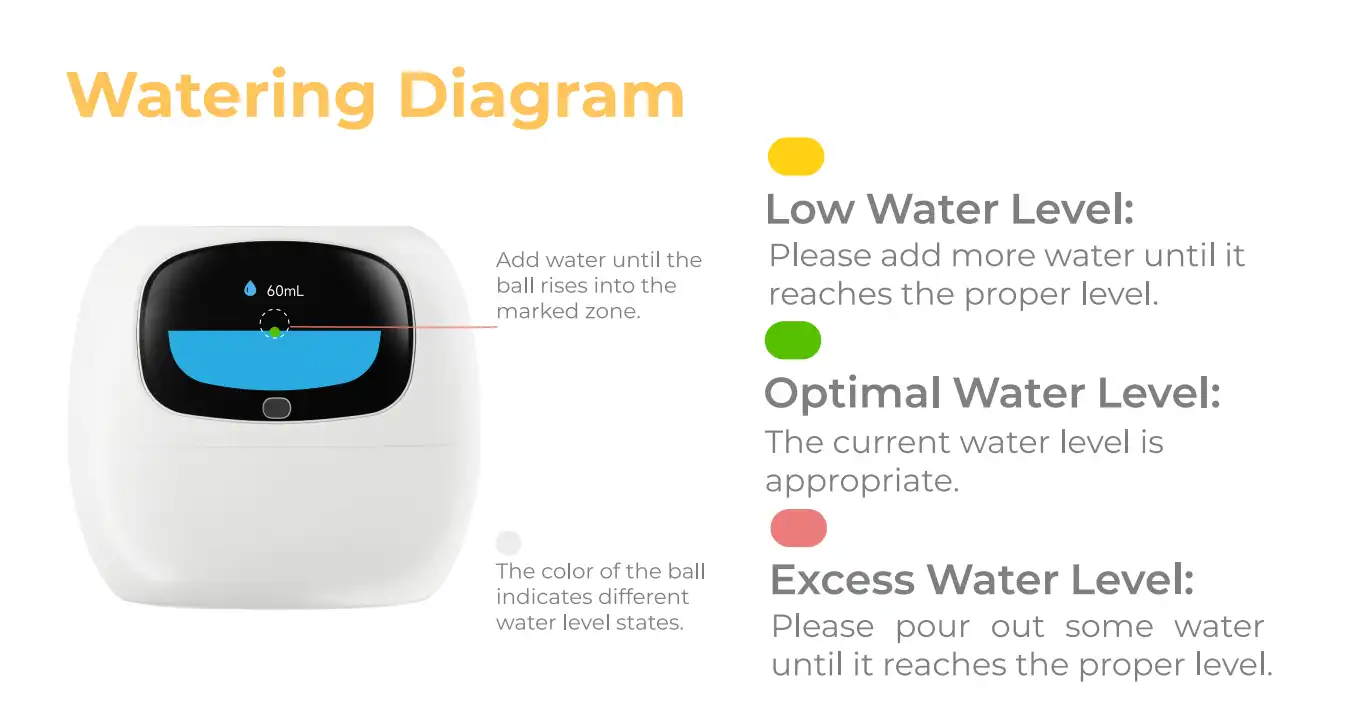
What You’ll See on the Watering Panel
- A small yellow ball will drop from the top of the screen.
- The panel displays the current water level in the water tank.
Understanding the Watering Indicators
- A dashed circular outline means Ivy needs water.
- This circle indicates the target water level range Ivy recommends.
- As you add water to the water tank:
- The water level rises, and
- The yellow ball floats upward accordingly.
When the Water Level Is Just Right
- When the yellow ball enters the target circle:
- The ball turns green, and
- The dashed circle becomes a solid line, indicating the correct amount of water has been added.
If Too Much Water Is Added
- If excess water is added:
- The circle turns red and traps the ball.
- If the water level exceeds the maximum tank capacity, Ivy will show an overflow warning.
Special Status Messages
-
“Absorbing from soil” (with no water shown):
This means Ivy does not need additional water right now. Please wait until the next watering cycle. -
“Initializing”:
Simply place the inner pot back in and wait a few minutes while Ivy completes the analysis.
🎁 Fun Easter Eggs
- You can touch the left or right side of the screen to move the yellow ball.
- When there is no water in the tank, touching left or right will make the ball bounce around playfully.
- If you gently shake Ivy, you’ll see water wave effects appear on the screen.